HP's TouchSmart TX2 - The Multitouch Laptop

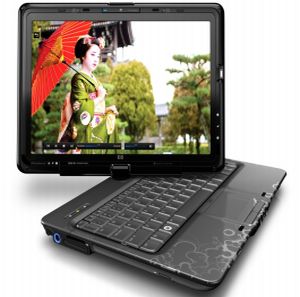
HP-touchsmart-tx2Everyone has been talking about multitouch technology since some time now. Its like the techie in us can never be satisfied! First we needed voice-activated, then we needed everything touch-screen-capable, and now, we need Multi-touch capable! As the tech world scrambles to keep the consumers happy, HP answers your requests with their latest TouchSmart tx2, the first consumer laptop to feature multi-touch functionality. If you haven't seen the cool promos on TV, you've really missed something! The new TouchSmart is not only sleek and cool, it indeed comes with a lot of functionality to satisfy your geeky-techie side! [image credit - Gizmodo]

HP's Touchsmart tx2 is a 12.1-inch convertible tablet that provides iPhone-like ability to scroll, zoom, flick, and drag and drop by using your fingers on the screen. For example, you can scroll up and down by using two fingers on the screen or zoom in and out by using a pinching motion.

Aside from its multitouchness, the tx2 looks like a standard convertible tablet with a center hinge that lets you twist the display to switch between notebook mode and slate tablet mode. Pricing starts at a reasonable $1,149. For that price, the TouchSmart tx2 features a 2.1GHz AMD Turion X2 CPU, 3GB of memory, a 250GB hard drive, integrated ATI HD3200 graphics, and 32-bit Vista Home Premium. Unfortunately, Core 2 Duo processors and discrete graphics are not offered. The Mediasmart 2.0 software lets you watch movies, look at photos, play music, listen to radio and watch TV on demand. HP is also partnering with MTV networks to bring IPTV content in from MTV, Comedy Central and Nickelodeon.

HP accomplished this feat, right in time for the holiday season, by partnering with an Israeli company called N-trig. Yes, you don't always have to wait for Microsoft to come and lend you a hand! I think its great that HP announced this new laptop, as it gives a nice option to those trying to choose between a Macbook and a PC.

It might not be able to lure away hard-core Mac followers, but the new Multi-touch TouchSmart tx2 surely has potential to attract a few consumers, especially those in their 20's or 30's, who want to look cool with their laptops! Efficiently designed, stylish, and affordably priced, HP might just see some sales this coming Holiday season!

To learn more about the features, functionality and configuration, visit HP's store and check out the buzz on TouchSmart tx2!


Read more!

Google's GPhone G1 vs iPhone 3G

google-gphoneFor those who haven't heard yet, Google and T-Mobile introduced the world to Android and the first Android device, the T-Mobile G1 yesterday evening. And with the much-awaited GPhone out, the natural comparison of how it fares vs the iPhone has become a hot topic! As expected, the T-Mobile G1(device by HTC) boasts of a lot of features & controls that look impressive, but the device is definitely not as good-looking as the iPhone. While people have been buzzing and raving about Android, the Google ODS that powers the gPhone, let's take a look at how the actual G1 devicee compares with the industry-leader iPhone 3G.
Apple and Google employ different strategies, different ideals, and different means but the goal is the same—to take as much of the cell phone market as they possibly can. Is either of them a clear winner? Read on to see if you can tell!

Henry Blogdet has a concise article that compares gPhone with the iPhone, as far as features and hardware is concerned. This should be a good starting point for your comparison. He's been testing the new G1, and considers it a worthy competitor to the iPhone. "But the two devices have different strengths and weaknesses, and are likely to attract different types of users", he adds.

While the iPhone is much more sleeker, stylish, lighter and thinner, the G1 aims to get an edge for its features like a user-friendly design, a keyboard, a 3M Auto-focus Camera, a changeable battery, a built-in navigation compass, the ability to copy/paste and others that iPhone lacks. Add this to the fact that its cheaper ($179 vs $199), and is not tied to just one carrier (though you'd have to pay a huge price to switch!), it does have some edge over the iPhone.

The iPhoneBlog also has a cool hardware comparison for both the phones. While its no eye-catcher, the first version og Google Phone is way better than what others generally offer, and Android is really up on really raving reviews! Google says the G1 is just a device to introduce people to the power of Android, and not to serve as an iPhone competitor. And hence there are mixed reviews about the device. While iPhone was a trend-setter, the gPhone aims to accomplish a different objective, making people embrace the power of Android - and I think it is successful in doing so! As Engadget says : "It’s a fine, solidly designed device that has enough style to please most users — but it won’t win a ton of beauty pageants."

Here's another article on gPhone reviews, which shows that while it doesn't set things on fire, it surely superceeded a lot of expectations. Where stalwarts like Samsung and RIM came out with devices that couldn't even come close to the iPhone, HTC has done a decent job of making a gPhone that is attractive and commendable for a first edition! T-Mobile has set up a page for G1 Emulator which allows you to become familiar with the G1’s basic functionality. I think it looks impressive, but hop on to play with one yourself, and you can decide who wins the gPhone vs iPhone wars!


Read more!

BerryStore - One-Stop-Shop for Cool Blackberry Applications

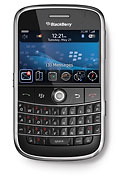
blackberry-appsAs RIM prepares to open its Blackberry Application Center to answer the iPhone’s App Store, an unaffiliated startup called the BerryStore has already launched a competing app store for Blackberry Apps. What makes it better than the official BlackBerry App Center (besides the name), is that apps in the BerryStore work across both old and new BlackBerries alike and across carriers. The BlackBerry Apps center, in contrast, is designed to be a carrier-specific store, with different apps for different carriers.

You can download the BerryStore as an app itself by visiting www.berrystore.com on your BlackBerry. (The App Center will require users to download apps through their Blackberry browsers, which is not the best experience). Already there are about 40 apps in the store, ranging from Loopt, 3Jam, and TwitterBerry to Obopay, Citysense, and Google Mobile. All of them are currently free, although the company plans on offering paid apps in the future. Here is a short list of Apps that I found interesting:

Books & Reference
NeoReader: Turns your Blackberry into a barcode scanner.
Blackberry Wiki: Wikipedia reader.
Beyond411: Yellow pages, maps, and directions.
MobipocketReader: Mobile e-reader.

Business & Finance
Obopay: P2P payments.
Bank of America: Manage your dwindling bank account.
NyTimes DealBook: A bookmark icon to the popular blog.
E-Trade Mobile Pro: Manage your dwindling stock portfolio.

Lifestyle
Google Mobile: Search, Maps, Gmail.
Opera: Opera Mini Web browser.
Zumobi:Mobile widgets.
Google Mail: As in Gmail.
Poynt: Local search.
Maufait InstaFind: Al-in-one 411, flight tracker, movie showtimes, stock quotes, weather, news.
Puretracks:Mobile music store.
Tellme: Voice-enabled GPS info.
reQall: Voice-to-text recorder, to-do list, and idea manager.
Nobex Radio Companion: Shows you the name of the songs playing on the radio.

News & Weather
Viigo: News, sports, entertainment, weather, stock and traffic alerts.
New York Times: Bookmark icon.
ABC News: Bookmark icon.
The Washington Post: Bookmark icon.
CNBC Mobile: Bookmark icon.
USA Today: Bookmark icon.
Slate: Bookmark icon.
PinStack.com: Forums

Social Networking
TwitterBerry: Mobile Twitter client that avoids SMS charges.
3jam: Group text messages.
eBuddy: Instant messaging app
Dexrex: Archives your text messages.
Pinger: Voice IM.

Sports
Sports Illustrated: Bookmark icon.
ESPN Mobile: Bookmark icon.

Travel & Navigation
Google Maps: What it sounds like.
GPSed: Map your GPS tracks, save them, and share them. Also geotags your photos.
Citysense: Live hotspot tracking.
WorldMate Live: A personal digital assistant for travelers

So all those Blackberry users out there, who've been tired and jealous of all the cool iPhone apps, here's your chance to show you off what your new blackberry device can do! Check out the BerryStore, and get ready for a wave of cool Blackberry Applications coming your way!


Read more!

How Safe is Your Internet Experience?

It is perhaps a little late to be asking this question, as Internet has become the lifeline for all of us. However, as more and more data keeps being added to the web space, and as we turn to the Internet for almost all of our needs, it becomes imperative to spend an honest thought on how safe the Internet really is! Hence the idea about a Trusted Internet has been floating around for some time now. We go online accepting the fact that not all sites are equally trustworthy or that we probably shouldn’t trust most online sites with our identities. But if Trusted Internet becomes a reality, every online interaction will include a new layer of security and trust enabled by an entire infrastructure designed to help us create mutual and real time trust, and make the web surfing a more stress-free and safe experience.

What exactly is Trusted Internet? And does something like this even exist? The anti-fraud signs that you see on some web-pages, especially e-commerce websites is a step towards achieving trust. It basically means that every digital interaction is safe and hack-proof. You no longer will be pestered with fraudulent sellers or identity thefts, and online search and shopping can become a universal standard, eliminating the shred of doubt about identity thefts.

With a Trusted Internet, we will be able to do things we can’t even try to do today - our PCs will automatically be able to find products or information we want from reputable, authenticated merchants and experts. Our computers will be able to proactively defend our identities ensuring, in real time, that our information is safe and has not been compromised. But most fundamentally it means that we will all able to connect with each other with full confidence that we can create trust online when and where we need it.

Today, Internet has become the go-to destination for most of the answers to our queries. I for one, spend almost 10-12 hours surfing the net, and that means a lot of time and data; it is advisable to not give out your personal information for anything and everything over the net. be careful while divulging important information, and don't go signing up for each application and newsletter unless you trust the source. Credit Card theft is a very small fraud, people have lost way more than money due to security issues on the net.

It is imperative to understand the need for a Safe Internet, and take steps to achieve it. Have a standard PC software at the minimum on your desktop or laptop; there are several browser applications available too. Choose something that comes with recommendation, and which safeguards your data. Don't forget a backup utility too, if you store data online!

Try installing some free software like Comodo’s award-winning firewall, anti-virus software & secure email software. Perform transactions only on known websites which use digital certificates to protect your personal data. It seems like a small thing until you actually face a fraud - so prevention is better than cure. Do your part in preserving your online data, and share the message about helping to develop a Trusted Internet!


Read more!